Fortnite Chest Tracker
A free Fortnite chest tracker for the Treasure Hunters season. Tap once for every chest you open, keep normal and Treasure Hours chests apart, and watch what the count is worth. No account, no Epic login, nothing to install.
Your chest log
Tip: press Space to log a chest without looking away from the game.
Already hunting for days? Type your totals straight into the boxes. Your log is saved in this browser only.
What your count means
chance you would have found the token at least once
- Still empty-handed
- 100%
- Hunters at your count with a token
- none yet
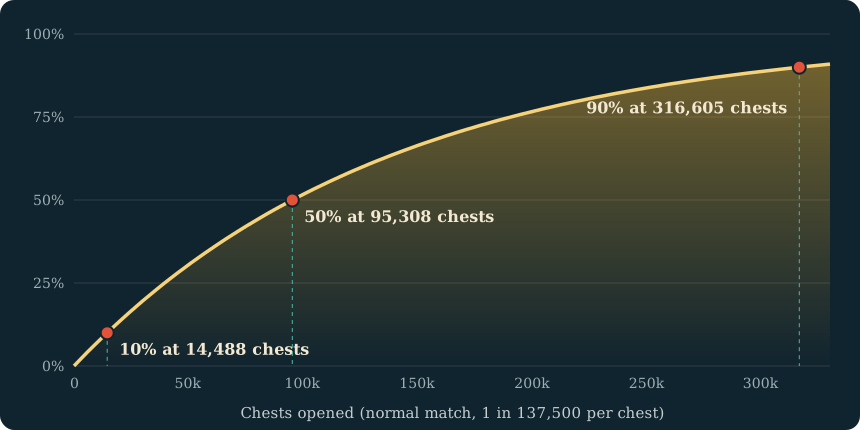
- More chests for a 50% shot
- 95,308
- Time to that 50% shot
- 1,906 hours
Change the odds
More Treasure Hunt tools
How the Fortnite chest tracker works
- Start from your real total. If you have been hunting for days, type the number you already have into “Normal chests” so the tracker picks up where you are.
- Count as you loot. Keep this page open on a second screen or your phone. Press Space or the big button each time a chest opens.
- Flip the switch during Treasure Hours. Chests opened in a boosted window go into their own box, because each one is worth more. The Treasure Hours countdown tells you when to flip it.
- Fix mistakes. “Undo” removes your last tap. You can also edit either box by hand at any time.
Why track chests at all?
Every Treasure Hunt prize is a random roll on each chest you open, and the rates are tiny. Without a count you only have a feeling that you have opened “a lot”. With a count you can see what a lot actually buys: 1,000 chests is a 0.7% chance of Pirate Shop Access, not the near-certainty it feels like after a long night.
A count also tells you when to stop. If the number says a coin-flip chance is still thousands of hours away at your pace, that is useful to know before you plan your week around it.
Why split Treasure Hours chests
During Treasure Hours the Pirate Shop Access rate is multiplied by 1.5, and one session ran at 2×. A single total would treat those chests like any other and understate your odds. Keeping them in a separate box lets the page do the math properly.
Private by design
Some trackers ask you to sign in so they can read your progress for you. This one does not. It is a manual counter: the trade is a little tapping in exchange for never linking an account.
What your Fortnite chest count is worth
The same count means very different things for different prizes. This table uses Epic's published rates for three of them. The full list is on the Treasure Hunt odds page.
| Chests opened | Weekly vehicle | Pirate Shop Access | Weekly gold outfit |
|---|---|---|---|
| 100 | 1.27% | 0.073% | 0.0064% |
| 500 | 6.20% | 0.363% | 0.032% |
| 1,000 | 12.0% | 0.725% | 0.064% |
| 5,000 | 47.3% | 3.57% | 0.319% |
| 10,000 | 72.2% | 7.01% | 0.638% |
At a steady 50 chests an hour, 1,000 chests is about 20 hours of play and 5,000 is about 100 hours. Set your own pace in the tracker and it works out the hours for you.
How to check your chest count in Fortnite
You do not have to remember every chest. Guides report that the game keeps a running total:
- Open the Quests tab from the lobby.
- Find the Treasure Hunt category in the list on the left. The mini-season is called Treasure Hunters, but the quest category is labelled Treasure Hunt.
- Read your total. The chest-opening quests show how many you have opened so far.
- Copy it into the tracker. Type the number into “Normal chests” and carry on counting from there.
The in-game total is the number to trust. Use this Fortnite chest tracker for what the game does not show: which chests were opened during Treasure Hours, and what the total means as a chance.
Chests in Treasure Hunters
Guides describe more than 500 treasure chests spread across the island this season, with ordinary chests turned into treasure chests. Vaults hold a small cluster of extra chests, and the keys that open them are random drops.
Epic's published rates are stated per chest opened in a normal match. If you are ever unsure whether a particular container counted, check whether the in-game Treasure Hunt total went up.
Playing in a squad
Guides report that chest progress goes to the player who opened the chest, so count only the ones you open yourself. They also report that when a squadmate finds Pirate Shop Access, the whole squad gets it. A teammate's chests do not add to your count, but their luck can still be yours.
Keeping the count honest
After each session, compare the tracker with the in-game total and correct the box if they differ. A count that drifts is worse than no count.
Fortnite chest tracker FAQ
Is there a chest counter inside Fortnite?
Guides report that your total appears under Quests in the Treasure Hunt section. It shows one running total. It does not split normal chests from Treasure Hours chests, which is the part this Fortnite chest tracker adds.
Does this chest tracker connect to my Epic account?
No. You count chests yourself. Nothing is read from your account and nothing is uploaded.
Where is my chest count saved?
In your browser's local storage on this device. It stays until you clear your browser data or press “Reset log”. It does not sync between your phone and your PC.
Which chests should I count?
Epic's published rates apply to each chest opened in a normal match. Count those. If you only want one number, copy the total from the in-game Treasure Hunt quests and type it in.
Does the chest tracker work on a phone?
Yes. The big button is sized for a thumb, so you can keep your phone next to your controller and tap as you loot. On a PC, the space bar does the same job.
Can I track more than one account?
The tracker keeps one log per browser. For a second account, use a different browser or a private window, or note the first total somewhere and reset.
How many chests should I expect to open before a prize?
It depends on the prize. An even chance of a Gizmo takes about 88 chests, a weekly vehicle about 5,416, and Pirate Shop Access about 95,308. None of them is ever guaranteed.
Is the count shared with the token odds calculator?
Yes. The Fortnite token odds calculator on the home page reads the same log, so a chest you count here is already included there.